> ## Documentation Index
> Fetch the complete documentation index at: https://docs.theauthapi.com/llms.txt
> Use this file to discover all available pages before exploring further.
# Listening for Events
> Build real-time workflows by listening for events on your API.
**The Auth API** enables you to connect 3rd party platform supporting a https request, to listen to realtime events. Webhooks are particularly useful for asynchronous events such as when a new API key is generated, first used, deleted or updated. We also support events for Auth Access and Project events.
### Supported events
| Type | Event | Trigger | Notes |
| --------------- | ---------- | --------------------------------------------- | ----------------------------------------------------------- |
| **API Keys** | Created | Fires the moment a new Key is created | API Key payloads will contain the API Key. |
| | Deleted | Fires the moment the API is deleted | |
| | Updated | Fires any time the key is updated | The metadata you choose to store on the key can be changed. |
| | First Used | Fires the first time the key is authenticated | |
| **Access Keys** | Created | Fires when a new access key is generated | Access Key payloads will contain the Access Keys token. |
| | Deleted | Fires when the access key is deleted | |
| | Updated | Fires when the access key is updated | |
| **Projects** | Updated | Fires when the project details get updated | |
#### What are webhooks?
A webhook enables the Auth API to push real-time notifications to your app. Auth API uses HTTPS to send these notifications to your app as a JSON payload. You can then use these notifications to execute actions in your backend systems. To learn more, see Auth API webhook events overview.
### Steps to receive webhooks
You can start receiving event notifications in your app or in a 3rd platform by following these steps:
* Identify the events you want to monitor and the event payloads to parse.
* Create a webhook endpoint as an HTTP endpoint (URL) on your local server or with a 3rd party like Zapier.
* Handle requests from Auth API by parsing each event object and returning `2xx` response status codes.
* Test that your webhook endpoint is working properly using our test connection feature.
* If you are coding your own endpoint, deploy your webhook endpoint so it’s a publicly accessible HTTPS URL.
* Register your publicly accessible HTTPS URL in the Auth API dashboard.
Creating Your first hook
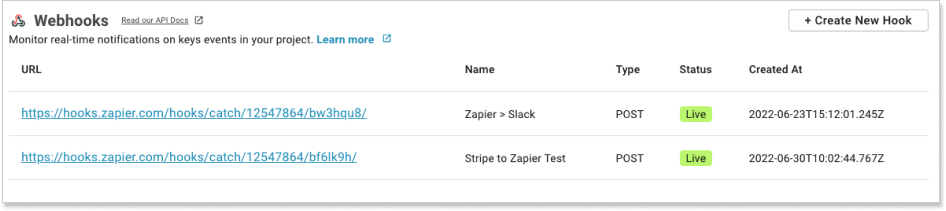
Head to your [dashboard](https://app.theauthapi.com) . Pick the project you want to tie your endpoint to and scroll to 'Webhooks'. Click '+ Create New Hook' and follow the instructions.
 #### Creating a webhook via the API
If you prefer a programmatic approach, you can create, update and delete webhooks (or any entity in The Auth API), head to our API docs - [https://docs.theauthapi.com/](https://docs.theauthapi.com/)
```CURL curl.txt theme={null}
curl --location 'https://api.theauthapi.com/webhooks' \
--header 'x-api-key: REPLACE_WITH_YOUR_ACCESS_KEY_FOUND_IN_YOUR_ACCOUNT' \
--data '{
"name": "only required fields webhook",
"url": "https://webhook.site/3d224d6e-b525-45dd-9a60-5581df9264b9",
"projectId": "REPLACE_WITH_YOUR_PROJECT_ID",
"topics": [
"api-key.created"
],
"httpMethod": "POST",
"status": "live"
}'
```
```javascript HelloWorld.js theme={null}
var request = require("request");
var options = {
method: "POST",
url: "https://api.theauthapi.com/webhooks",
headers: {
"x-api-key": "REPLACE_WITH_YOUR_ACCESS_KEY_FOUND_IN_YOUR_ACCOUNT",
},
body: '{\n "name": "only required fields webhook",\n "url": "https://webhook.site/3d224d6e-b525-45dd-9a60-5581df9264b9",\n "projectId": "REPLACE_WITH_YOUR_PROJECT_ID",\n "topics": [\n "api-key.created"\n ],\n "httpMethod": "POST",\n "status": "live"\n}',
};
request(options, function (error, response) {
if (error) throw new Error(error);
console.log(response.body);
});
```
### Building your own webhook endpoint
Creating a webhook endpoint is no different from creating any other page on your website. It’s an HTTP or HTTPS endpoint on your server with a URL. For local testing e.g. [http://localhost:3000](http://localhost:3000) consider using something like [ngrok](https://ngrok.com/) to route requests to your local machine. When it's ready to launch, it must be running over HTTPS on a publically accessible domain. You can use one endpoint to handle several different event types at once or set up individual endpoints for specific events.
#### Testing your endpoint
When creating your webhook, you can test your endpoint. It's important to test that the endpoint is up and running and receiving events successfully.
#### How to no-code an endpoint
The Auth API webhooks make it super simple to connect 3rd party applications like [zapier.com](https://zapier.com/), [automate.io](https://automate.io/), [stripe.com](https://stripe.com/) etc. to ensure you're able to use the platform without any developer skills.
#### Security Best Practices
To read more about best practices and security, read this article: [Best Practices for Webhooks](guides/events-best-practice).
#### Creating a webhook via the API
If you prefer a programmatic approach, you can create, update and delete webhooks (or any entity in The Auth API), head to our API docs - [https://docs.theauthapi.com/](https://docs.theauthapi.com/)
```CURL curl.txt theme={null}
curl --location 'https://api.theauthapi.com/webhooks' \
--header 'x-api-key: REPLACE_WITH_YOUR_ACCESS_KEY_FOUND_IN_YOUR_ACCOUNT' \
--data '{
"name": "only required fields webhook",
"url": "https://webhook.site/3d224d6e-b525-45dd-9a60-5581df9264b9",
"projectId": "REPLACE_WITH_YOUR_PROJECT_ID",
"topics": [
"api-key.created"
],
"httpMethod": "POST",
"status": "live"
}'
```
```javascript HelloWorld.js theme={null}
var request = require("request");
var options = {
method: "POST",
url: "https://api.theauthapi.com/webhooks",
headers: {
"x-api-key": "REPLACE_WITH_YOUR_ACCESS_KEY_FOUND_IN_YOUR_ACCOUNT",
},
body: '{\n "name": "only required fields webhook",\n "url": "https://webhook.site/3d224d6e-b525-45dd-9a60-5581df9264b9",\n "projectId": "REPLACE_WITH_YOUR_PROJECT_ID",\n "topics": [\n "api-key.created"\n ],\n "httpMethod": "POST",\n "status": "live"\n}',
};
request(options, function (error, response) {
if (error) throw new Error(error);
console.log(response.body);
});
```
### Building your own webhook endpoint
Creating a webhook endpoint is no different from creating any other page on your website. It’s an HTTP or HTTPS endpoint on your server with a URL. For local testing e.g. [http://localhost:3000](http://localhost:3000) consider using something like [ngrok](https://ngrok.com/) to route requests to your local machine. When it's ready to launch, it must be running over HTTPS on a publically accessible domain. You can use one endpoint to handle several different event types at once or set up individual endpoints for specific events.
#### Testing your endpoint
When creating your webhook, you can test your endpoint. It's important to test that the endpoint is up and running and receiving events successfully.
#### How to no-code an endpoint
The Auth API webhooks make it super simple to connect 3rd party applications like [zapier.com](https://zapier.com/), [automate.io](https://automate.io/), [stripe.com](https://stripe.com/) etc. to ensure you're able to use the platform without any developer skills.
#### Security Best Practices
To read more about best practices and security, read this article: [Best Practices for Webhooks](guides/events-best-practice).